


Most tutoring centers run on trust and habit. Parents hand over a kid's name, birthday, school, sometimes an IEP, occasionally a diagnosis — and the center just... stores it. In a shared Google Drive. In a WhatsApp thread. In a tutor's personal notebook that goes home in a backpack every night.
That works fine until it doesn't. And when it stops working, it usually stops all at once. A parent asks who has access to their kid's assessment scores, a former tutor still has a login six months after quitting, or a school district requests documentation and you realize you can't actually say where the records live or who's touched them.
Tutoring student data governance isn't a compliance checkbox. It's an operational system that connects intake, staffing, vendor relationships, and how you respond when something breaks. Get it right and audits become boring. Get it wrong and you're improvising under pressure with a parent who's already angry. This is the system view — how the pieces fit, where they crack under growth, and what audit-ready actually looks like at a small center.
Why data governance quietly breaks in growing centers
The problem almost never starts with negligence. It starts with a center small enough that one person knows everything. The owner remembers which parents signed what, which tutor works with which kid, where the sensitive files are. Governance lives in someone's head.
Then you add a second location, or three part-time tutors, or a front-desk person. Suddenly the knowledge that lived in one brain needs to be written down — and it never fully is. The first real crack tends to show up around the 40–60 active student mark. That's roughly the point where no single person can track who has access to what anymore.
-
One shared drive, everyone has access to everything
-
Consent handled verbally or through a form nobody keeps
-
Tutor logins created but never deleted
-
Vendor tools (scheduling, video, messaging apps) added ad hoc, each holding student data nobody audits
Individually, none of these feel dangerous. Together they form a system with no boundaries. A part-time tutor who covered one session in March can still open the folder containing every family's contact info and every child's learning profile in November. Nobody decided that on purpose. It just accumulated.
The insight most owners miss: data governance failures are almost always access failures. The data itself isn't usually the problem. Too many people can reach it, and nobody can reconstruct who reached it when.
The five systems that make a center audit-ready
Audit-readiness isn't one document. It's five connected systems that each cover a different failure point. When they work together, an audit becomes a matter of pulling files, not scrambling to invent them.
Never miss another tutoring session.
Tutoryly helps you schedule, confirm, and manage every tutoring session efficiently.
- Unified session scheduling
- Automated student notifications
- Tutor calendar & availability management
No credit card required
| System | What it controls | The failure it prevents |
|---|---|---|
| Parental consent | What you're allowed to collect and share | Sharing data you had no permission to share |
| Retention schedules | How long you keep records | Hoarding sensitive data long past its usefulness |
| Role-based access | Who can see and edit what | Ex-staff and over-permissioned tutors |
| Vendor checklists | Which third parties touch student data | Blind exposure through tools you forgot you use |
| Incident response | What happens when something breaks | Panic, delay, and inconsistent parent communication |
Each of these needs a real SOP — not a paragraph in an employee handbook nobody reads, but an actual documented process with clear owners and triggers.
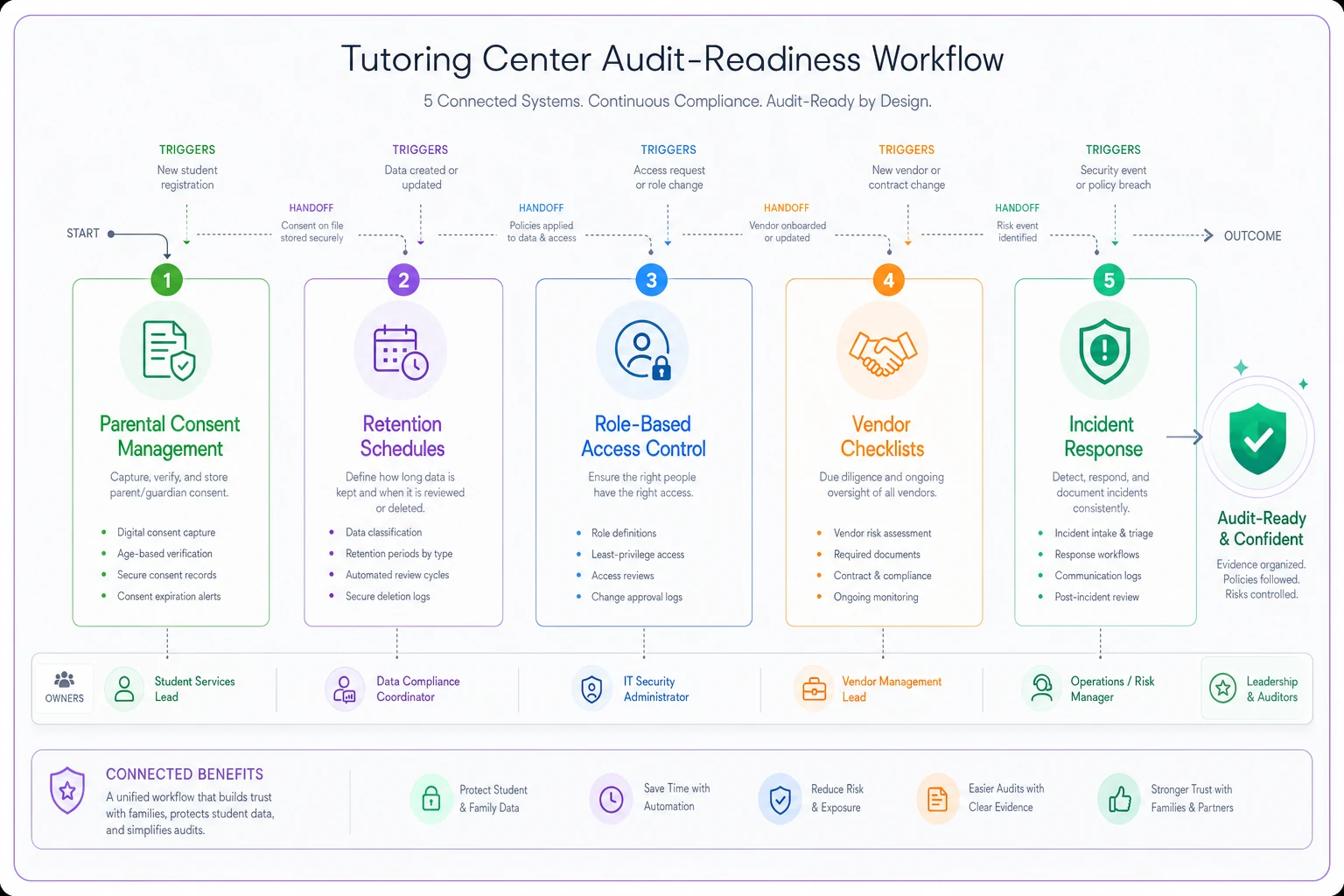
A simple visual like this makes it easy to show staff how the pieces flow together.
Parental consent: the foundation everything else sits on
Consent is where governance either starts clean or starts broken. A lot of centers treat the enrollment form as consent. It usually isn't. A form that collects a parent's phone number doesn't automatically give you permission to share a child's assessment scores with a school, upload their work to a third-party app, or use their progress in marketing.
Good consent is specific and separable. That means the parent isn't signing one giant blanket "yes" — they're agreeing to distinct things, and they can say no to some without leaving the program.
A practical consent template covers these buckets separately:
-
Core enrollment data — collecting name, contact info, grade level, and academic goals (required to provide the service)
-
Sensitive learning data — diagnoses, IEP details, behavioral notes (optional, opt-in)
-
School and third-party sharing — permission to communicate with a child's teacher or district
-
Tools and platforms — consent for the specific vendors that will store the child's work or data
-
Marketing and testimonials — using a student's name, photo, or results publicly (always separate, always opt-in)
The mistake nearly everyone makes is bundling number 5 with number 1. A parent signs up for tutoring and accidentally consents to their kid's face appearing on your Instagram. When that surfaces during an audit — or worse, when the parent notices — it reads as either sloppy or deceptive.
One more thing centers regularly forget: consent has to be re-collectable. Kids age up. Consent signed for a 9-year-old should get revisited. And if you change vendors — say you swap your video platform — the old consent didn't cover the new tool. Build a light annual re-confirmation into your intake cycle so consent doesn't quietly go stale.
Retention schedules: stop keeping everything forever
Keeping data forever isn't caution — it's risk. Every record you hold is a record you're responsible for protecting, and one that shows up in an audit. The center that "never deletes anything just in case" is carrying years of former students' sensitive files with no reason and no protection plan.
A retention schedule answers one question for every data type: how long do we keep this, and what happens when the clock runs out?
A workable schedule for a small center:
| Record type | Keep for | Then |
|---|---|---|
| Active student profiles | Duration of enrollment | Move to archive on exit |
| Financial/billing records | 7 years (tax reasons) | Delete or anonymize |
| Session notes & progress | 2–3 years after exit | Delete |
| Assessment/diagnostic data | 2 years after exit | Delete |
| IEP and sensitive health info | Return or delete on exit unless legally required | Delete |
| Marketing consents | Until withdrawn | Delete on request |
The numbers vary by jurisdiction, so check what applies where you operate. The point is the discipline, not the exact figures.
Where this breaks in practice: nobody owns the deletion step. Retention schedules are easy to write and almost never executed, because deleting requires someone to remember to do it. The fix is to tie deletion to an event you already track — a student's exit from the program — rather than a calendar nobody watches. When a family leaves, the offboarding checklist triggers the retention clock. That's the difference between a policy and a practice.
Role-based access: the part that actually stops leaks
If you fix only one thing, fix this. Role-based access is the single highest-leverage control in the whole system, because most breaches aren't hackers — they're over-permissioned insiders and forgotten logins.
The principle is simple: people get access to what their role requires and nothing more. A tutor needs to see the students they teach — their notes, goals, and schedule. They don't need every family's billing history or the contact details of kids they've never met.
-
Owner/Director — full access, including audit logs and vendor management
-
Center manager — student and scheduling data, limited financial access
-
Front desk/admin — contact info, scheduling, payment processing, no sensitive learning data
-
Tutor — only assigned students, only relevant notes and goals
-
Substitute/temp tutor — time-limited access to a single student or session, auto-expiring
That last role is the one centers never build, and it's where a lot of quiet exposure happens. A sub covers two sessions, gets handed a full login, and that login never gets revoked. Give temporary staff temporary, scoped access from the start.
Give temporary staff temporary, scoped access from the start.
Manual permission management falls apart fast in practice. When you're creating and deleting access by hand across a growing team, someone always slips through — the tutor who left in spring whose account is still live in fall. This is where an operational platform earns its keep. AI-assisted operational software can automatically flag dormant accounts, revoke access when a staff member's status changes, and maintain the access log an auditor will ask for — the kind of tracking that's tedious and error-prone to do by hand. You're not adding a tool for the sake of it; you're closing the gap where human memory reliably fails.
Access rules also connect directly to how you handle families. If you run consolidated family accounts, permissions get more layered — one parent might have access to two kids' data while a co-parent has access to one. Getting the underlying data model right matters here, which is something we covered in depth in the piece on family account data models and consolidated billing. Access and account structure aren't separate problems; they're the same problem viewed from two angles.
Vendor checklists: the exposure you forgot you had
Every tool that touches student data is a link in your governance chain, and the chain is only as strong as the sloppiest vendor. Most centers underestimate how many vendors they actually use. Scheduling software, video conferencing, messaging apps, a learning platform, cloud storage, an email tool, a payment processor — each one holds or transmits student data.
The problem isn't having vendors. It's having them without knowing what they do with the data, and without being able to answer for them in an audit.
A vendor checklist for each tool should confirm:
-
What student data it stores or processes
-
Where that data physically lives (which country/region)
-
Whether it has a data processing agreement you've actually signed
-
How access is controlled on their end
-
What happens to your data if you cancel
-
Whether they've had breaches, and how they notified customers
A typical example of how this goes wrong: a center uses a free consumer messaging app to send session updates because it's convenient. That app now holds parent phone numbers and casual mentions of a child's progress and struggles — on a platform with no data agreement and no control over what happens to that information. It felt like nothing. In an audit, it's a real exposure.
Run this checklist before adopting any new tool, and again annually for existing ones. Vendors change their terms. A tool that was fine last year might have quietly changed how it handles data.
Incident response: what you do in the first 24 hours
No system is perfect. A tutor's laptop gets stolen. An email with a student's report goes to the wrong parent. A vendor announces a breach. What separates a manageable incident from a disaster is whether you have a plan before it happens — because the middle of an incident is the worst time to invent one.
An incident response process for a small center doesn't need to be corporate. It needs to be clear enough that a stressed manager can follow it at 8pm without calling the owner.
-
Contain — stop the exposure. Revoke the access, recover the device, pull the errant email if possible.
-
Assess — what data was involved, whose, and how sensitive? A wrong-recipient email with a phone number is different from exposed IEP records.
-
Document — write down what happened, when it was discovered, and what you did, in real time. This record is what makes the incident defensible later.
-
Notify — tell affected families promptly and honestly, and any authorities if the law requires it. Have a template ready so the message is calm and consistent, not panicked.
-
Review — after it's contained, figure out what let it happen and close that gap.
The step centers consistently skip is number 3. Documentation during an incident feels like a distraction when you're busy fixing the problem, but it's what an auditor and an angry parent will both want. "We noticed within an hour, contained it, and notified you the same day" is a completely different story than "we're not sure exactly what happened or when."
The other quiet failure: notification tone. A defensive, lawyered-up message erodes trust even when you handled the incident well. A straight, human message — here's what happened, here's what we did, here's what we're changing — often preserves the relationship. Parents forgive mistakes handled openly far more than they forgive being managed.
When this level of rigor actually makes sense (and when it's overkill)
Not every center needs the full system on day one. A solo tutor with eight students and one spreadsheet doesn't need role-based access tiers. Building heavy governance too early wastes energy that should go toward teaching and growth.
This full system makes sense when:
-
You have more than a handful of staff or contractors
-
You handle sensitive data — IEPs, diagnoses, health info
-
You operate across multiple locations
-
You share data with schools or districts
-
You've hit the point where no one person can track access anymore
It's overkill when:
-
You're a solo operator with a small caseload
-
No sensitive data is involved beyond basic contact info
-
Everything genuinely lives in one place under one person
Who should not skip it, no matter how small: any center working with special-needs students or handling health-related learning data. The sensitivity of that data raises the stakes regardless of size. If you're doing IEP-informed work that requires tight documentation, governance isn't optional — it's part of the service.
The honest middle path for most growing centers is to build in order of risk: access control first, then consent, then vendor review, then retention and incident planning. Access and consent stop the bleeding. The rest makes you audit-ready.
A real scenario: what changed after a near-miss
A mid-sized center — around 90 active students, six part-time tutors, two locations — got a request from a school district for a student's records during an IEP review. When they went looking, they found three problems in an afternoon: the student's assessment data existed in two conflicting versions, a tutor who'd left four months earlier still had drive access, and there was no signed consent on file authorizing school communication for that specific family.
Nothing had actually leaked. But the scramble exposed how fragile the whole thing was. If the district had been an auditor, or if that former tutor had misused the access, it would've been a genuine crisis instead of a scare.
Over the next couple of months they rebuilt around the five systems. Access got scoped by role, with tutor accounts tied to active status so departures auto-revoked. Consent got split into separable buckets and re-collected at intake. They inventoried their vendors and dropped two consumer apps that had no business holding student data. They wrote a one-page incident plan and a retention schedule tied to student exit.
The measurable difference wasn't dramatic in a flashy way. Record requests that used to take a stressful half-day now take under an hour. The number of people with access to sensitive files dropped by more than half. And the next time a parent asked who could see their kid's information, the director could actually answer — which, quietly, is worth more to trust than any marketing.
Bringing it together
Data governance in a tutoring center isn't really about privacy law. It's about whether your operation can answer a simple question under pressure: who has this child's information, why, and for how long? The centers that can answer it cleanly aren't the ones with the biggest compliance budgets. They're the ones who built five connected systems — consent, retention, access, vendors, and incident response — and tied them to events they already track.
Consent decides what you can hold. Access decides who can reach it. Vendors extend the boundary. Retention shrinks the surface over time. Incident response catches what slips through. None of them work alone, and all of them get harder as you add students and staff. That's why governance should scale alongside quality — the same way a strong quality-assurance loop with clear rubrics and cadence turns good intentions into consistent operations. Governance is that loop applied to trust instead of teaching.
Build it while you're small enough to build it calmly. The alternative is building it in the middle of an audit, an incident, or a parent's phone call — and that's a far worse time to figure out where the records live.
Build it while you're small enough to build it calmly. The alternative is building it in the middle of an audit, an incident, or a parent's phone call — and that's a far worse time to figure out where the records live.
Ready to streamline your tutoring operations?
Join 500+ tutors and centers using Tutoryly to save time, improve scheduling accuracy, and enhance student experiences.