



A single cancelled tutoring session typically means $60–80 in lost revenue. Multiply that by 8–10 cancellations per week — which most tutoring centers deal with — and you're bleeding somewhere around $2,400 out of your schedule every month.
The frustrating part? Most centers have students actively waiting for slots. They just can't connect those dots fast enough when cancellations happen.
Why traditional waitlists fail for tutoring operations
Standard waitlists treat every cancellation the same — send a blast message and hope someone responds. But tutoring cancellations have patterns that generic systems miss completely.
Tuesday afternoon cancellations rarely get filled because parents are already driving kids to activities. Friday morning slots fill instantly if you message the right people. A math tutor's 4pm opening needs completely different handling than a SAT prep cancellation on Saturday at 10am.
The operational challenge gets worse with mixed session types. A 30-minute reading comprehension slot can't automatically substitute for a 60-minute calculus session. Group SAT prep spots need different messaging than one-on-one elementary math. Most centers try managing this through spreadsheets and manual texts, and opportunities slip through constantly.
What usually happens: a parent cancels Thursday 5pm algebra at 2pm. The coordinator sees the email an hour later, checks a paper list, texts three families individually, waits, follows up again at 4:30pm, and the slot stays empty. Meanwhile, two families who would've grabbed that opening never even knew it existed.
Priority rules that match real tutoring patterns
Effective waitlist systems need layered priority logic that reflects how families actually book tutoring.
Never miss another tutoring session.
Tutoryly helps you schedule, confirm, and manage every tutoring session efficiently.
- Unified session scheduling
- Automated student notifications
- Tutor calendar & availability management
No credit card required
Prioritize families who've recently booked similar sessions — they've already demonstrated schedule fit and subject interest.
Subject matching is your foundation. When an algebra II slot opens, students currently in algebra I or geometry get first priority. Elementary reading students shouldn't see high school chemistry openings. This seems obvious, but manual systems miss these filters constantly.
Schedule compatibility comes next. Parents with kids already coming Tuesday/Thursday won't add a Wednesday slot, no matter how good the subject match. But families doing Monday/Wednesday might jump at Thursday availability if they're trying to increase frequency before exams.
Payment patterns matter too. Families on monthly unlimited plans grab extra slots differently than per-session payers. Package buyers near their session limit need different messaging than those with sessions expiring soon. A family with 2 sessions left this month responds differently than one sitting on 12 banked sessions.
Geography is underrated. A family driving 25 minutes won't take a same-day slot unless their kid is already in the area. Families within 10 minutes often grab last-minute openings, especially around exam season.
| Priority | Rule |
|---|---|
| 1 | Same subject + compatible schedule + geographic proximity |
| 2 | Adjacent subject + perfect schedule match |
| 3 | Same subject + schedule flexibility shown before |
| 4 | General waitlist + strong payment history |
The hierarchy typically looks like:
-
Same subject + compatible schedule + geographic proximity
-
Adjacent subject + perfect schedule match
-
Same subject + schedule flexibility shown before
-
General waitlist + strong payment history
The hierarchy above helps you narrow outreach to families who are both relevant and likely to respond, reducing noise and improving fill rates.
Notification timing that drives responses
Timing determines fill rates more than almost any other factor. Most centers blast everyone immediately when cancellations hit — which trains parents to ignore the messages.
For same-day cancellations before 2pm, your first wave goes out within 5 minutes to high-priority matches only. Give them 20 minutes to respond before the second wave hits. That window is long enough for a working parent to see and reply without feeling rushed, but short enough to still fill the slot.
Next-day cancellations work differently. First notifications go out immediately to top matches with a 1-hour window. Second wave follows with 30 minutes. The longer timeline reduces panic-booking while still creating urgency.
Weekly cancellations beyond 48 hours work best with stepped messaging — priority families get 2–4 hours before it opens to everyone. This respects waitlist position without leaving money on the table from slow responses.
Weekend slots need adjusted timing entirely. Friday afternoon cancellations for Saturday morning? Message Thursday evening, not Friday at 3pm when parents are already managing weekend logistics. Saturday cancellations for Sunday? Saturday morning notifications work significantly better than Friday night.
The timing that kills response rates: school pickup (2:45–3:30pm), dinner prep (5:30–7pm), or after 8:30pm for next-day slots. Parents either miss these completely or feel annoyed by them.
Messaging templates calibrated for urgency and value
Generic "slot available" messages get ignored. Parents need context, urgency, and a clear reason to change their plans.
"Hi Michelle - Emma's regular algebra tutor had a Thursday 5pm slot open up tomorrow. Since she's been working on quadratics, this would be perfect timing before Friday's quiz. Reply YES to grab it, or NO to stay on the waitlist. Slot closes in 20 minutes."
That message names the student, references current work, connects to an upcoming need, gives clear action steps, and creates time pressure without feeling pushy.
"Quick heads up - a 60-minute SAT math slot just opened for tomorrow (Thursday) at 5pm. Two families are considering it, so let me know by 3:30 if you're interested."
Social proof and urgency, without the personal details that slow things down.
"Saturday 10am algebra slot available this week only. Perfect for test prep or catching up. First response gets it — reply YES to claim."
Bad messaging patterns to avoid: "Dear valued client" formality, lengthy explanations about why the slot opened, multiple slots crammed into one message, or vague timing like "later this week."
Your templates need versions for:
-
Same-day urgent (under 4 hours)
-
Same-day standard (4–8 hours)
-
Next-day morning slots
-
Next-day afternoon/evening
-
48–72 hour advance
-
Recurring weekly opening
-
Group session spots
-
Online versus in-person
Each category needs different urgency levels and value framing.
Automation flows that handle complexity without confusion
The real power comes from connecting priority rules, timing, and messaging into flows that handle the messy reality of cancellations without a coordinator manually managing every step.
A standard cancellation flow looks like this:
Cancellation logged → System checks session type, time until appointment, and day of week → Pulls priority list based on subject and schedule compatibility → Sends wave 1 messages to top 3–5 matches → Starts 20-minute timer → No response triggers wave 2 to next 5–8 matches with 15-minute window → Still unfilled triggers general broadcast → First YES gets automatic confirmation → Others receive "sorry, just filled" message → Calendar updates automatically
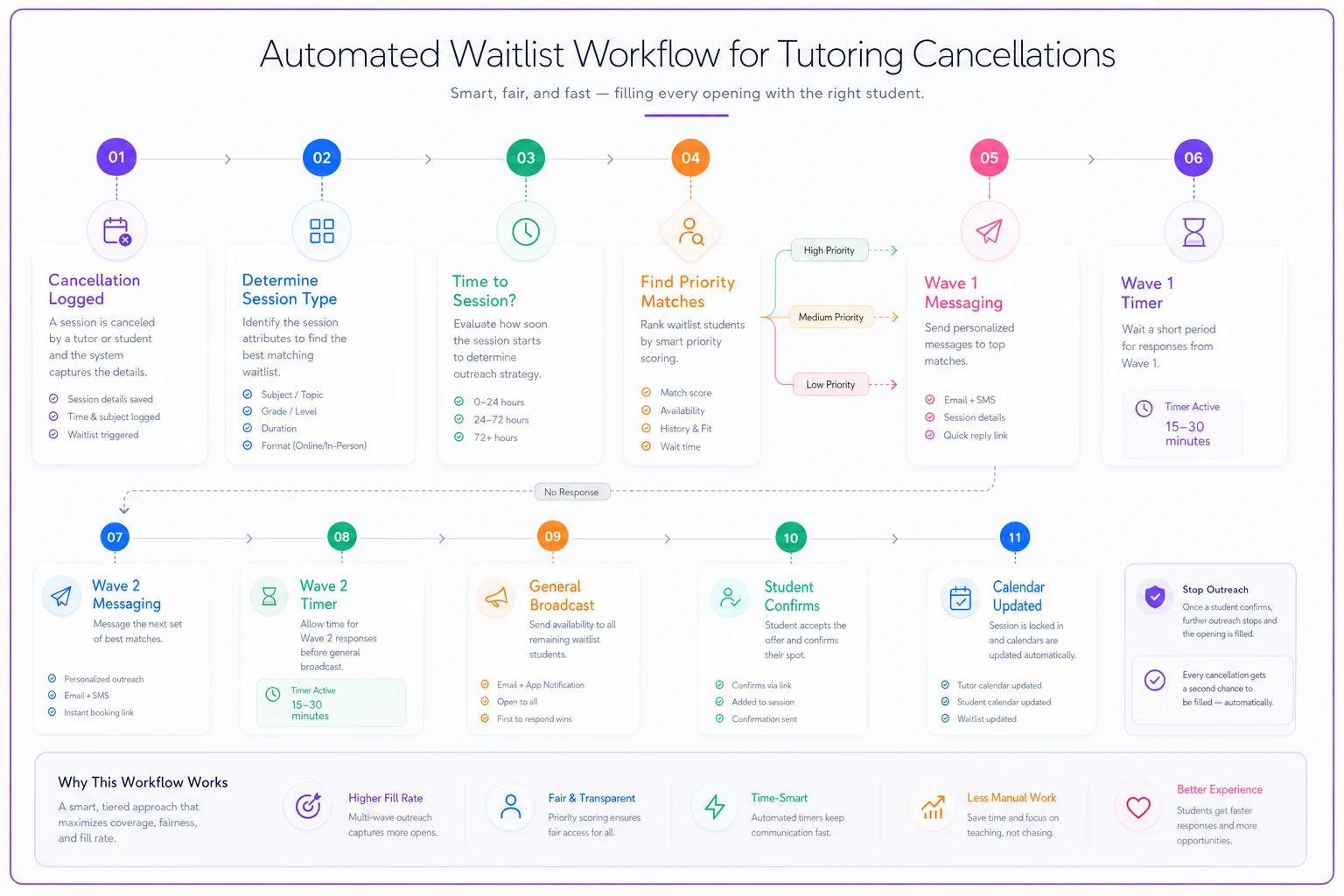
This visual maps the branching logic and timers so coordinators can audit and tweak flows quickly.
Real operations need branching logic for common situations.
Late cancellations under 2 hours skip straight to broad notifications with 10-minute response windows. Premium clients might get exclusive 30-minute windows regardless of timing. Group sessions trigger different flows entirely — sometimes offering the spot at a discount rather than leaving it empty.
Package holders near expiration get "use it or lose it" messaging. Monthly unlimited families see "bonus session" framing. Per-session payers receive standard availability notices.
The system needs to handle response conflicts too. When multiple YES replies hit within seconds, the first gets confirmed while others immediately get alternatives: "That spot just filled, but we have Friday 4pm or Saturday 9am — interested?"
No response after all waves? The system logs it as unfilled and either offers the tutor paid prep time or moves them to another task. Repeated non-responses from waitlisted families should trigger a check-in about whether they actually want to stay on the list.
Conversion tracking that reveals what actually works
Most centers track only whether slots filled or not. That binary metric misses the patterns that could meaningfully improve fill rates.
Track response rates by notification wave. If wave 1 consistently gets 40% opens but only 10% positive replies, your priority rules might be off. Wave 2 outperforming wave 1 on conversion is a signal your matching logic needs adjustment.
Fill rates by time-to-session matter a lot. Same-day fills under 2 hours might run around 20%, while 24-hour advance might hit 75%. That data shapes how you handle different cancellation windows and can influence your cancellation policy.
Day-of-week patterns are worth watching closely. Monday cancellations might fill at a solid rate while Fridays drop significantly. Time-of-day analysis tends to reveal similar gaps — 4pm slots might consistently outperform 6pm fills.
Subject-specific conversion shows where to focus waitlist recruitment. If algebra fills reliably but writing sits low, you know which waitlist needs building. Grade-level analysis might show middle school slots filling easily while elementary struggles.
The metrics that actually drive revenue improvement:
-
Average time from cancellation to fill
-
Fill rate by hours of advance notice
-
Response rate by message wave
-
Conversion by message template
-
No-show rate for waitlist fills
-
Lifetime value of waitlist conversions
These metrics let you iterate on priority rules, timing, and messaging to actually improve recovered revenue.
Real scenario: how a math center worked through this
A 12-tutor math center was losing somewhere around $3,000–$3,500 monthly to unfilled cancellations — the number shifted a bit depending on the month and who was tracking it. They averaged 40–50 cancellations weekly across all instructors, with maybe 30% getting filled through manual coordinator efforts.
The core problem wasn't effort. The coordinator was genuinely working hard — 2–3 hours daily managing cancellations through texts and calls. But she could only handle things in real time during business hours. Evening and weekend cancellations almost never filled, and by Monday morning nobody remembered to follow up.
The first two weeks of automation weren't impressive. They set up basic flows that captured all cancellations and sent simple broadcast messages. Fill rate jumped to around 45%, mostly just from speed — the messages were going out in minutes instead of hours. The coordinator's reaction was roughly: "I can't believe we were waiting this long."
Adding priority rules in weeks three and four — subject level, schedule compatibility — pushed the fill rate closer to 55%, and the volume of outgoing messages actually dropped. Fewer parents were getting notified about sessions that weren't relevant to them.
The harder work was timing. They tested afternoon slots and found that 90-minute advance notice worked better than immediate notification for a chunk of their families. Morning slots converted better with night-before messages. That took some trial and error, and the improvements weren't perfectly linear — some weeks were better, some worse, depending on how many cancellations came in and when.
By month three, with branching logic, package-aware messaging, and proper response handling in place, fill rates were running consistently in the 65–75% range. Some months hit the higher end, some didn't. The revenue recovery was real and meaningful, though the exact figure fluctuated.
The coordinator now spends maybe 30 minutes a day reviewing patterns and adjusting rules. Response complaints from parents dropped considerably because families were only getting notified about sessions that actually made sense for them.
When waitlist automation makes sense versus when it doesn't
This level of automation pays off when you're dealing with 20+ cancellations weekly. Below that volume, the complexity might outweigh the benefit. A five-tutor center with 3–4 weekly cancellations can probably manage with solid templates and manual outreach.
Centers with highly specialized tutors need careful implementation. If only one instructor teaches Mandarin or AP Physics, waitlist automation won't solve the availability problem — you need backup instructor protocols first.
Test prep centers tend to see strong ROI because of session interchangeability. SAT math students can often take any qualified instructor's slot. General subject tutoring with multiple instructors per subject also benefits quite a bit.
One-on-one tutoring fills easier than group sessions through automation. Group dynamics, friend pairs, and level matching add complexity that usually needs human judgment.
The investment makes sense if you're currently:
-
Losing $1,500+ monthly to unfilled slots
-
Having coordinators spend 10+ hours weekly on cancellation management
-
Seeing parent complaints about missing openings they wanted
-
Operating multiple locations with different coordinators
Use these thresholds to decide whether to pilot automation or stick with improved manual processes.
Integration with existing operations
The waitlist system can't operate in isolation. It needs clean handoffs with scheduling, billing, progress tracking, and instructor management.
When a waitlist fill happens, instructors need different information than for a regular session — whether it's a new student, any specific focus areas from the waitlist signup, and whether this is a one-time fill or a potential recurring slot.
Billing integration prevents awkward conversations. Package holders should see automatic deduction, per-session families get charged appropriately, and expired packages should trigger renewal notices rather than session confirmations.
Progress tracking needs to adjust for irregular attendance. A student grabbing occasional waitlist spots needs different assessment than a weekly regular. The system should flag these patterns for coordinator review.
Waitlist fills should also feed back into demand planning. High conversion for certain subjects and times suggests you need more instructor capacity there. Low conversion despite high waitlist numbers might point to messaging or timing problems rather than actual demand.
Avoiding the common implementation mistakes
The biggest mistake: launching with overly complex rules before you understand your own patterns. Start simple — basic subject matching and one-wave notifications. Add sophistication after you see what's working.
Second major error: forgetting the human element. Parents appreciate automated efficiency but hate feeling like a number. Keep some personal touches — coordinator names in messages, occasional check-ins with frequent waitlist users, flexibility for special circumstances.
Third problem: ignoring instructor input. Teachers know which students would benefit from extra sessions, which families are reliable for last-minute fills, and when substitutions make sense or don't. Build in ways to capture and use that knowledge.
Message fatigue is also underestimated. Parents who get 3–4 waitlist notifications weekly start ignoring all of them. Being selective with high match rates beats blasting everyone constantly.
Response windows that are too tight frustrate families. Too loose and you leave money on the table. The sweet spot is usually 15–30 minutes for same-day, 1–2 hours for next-day, and longer for advance notice.
Measuring success beyond fill rates
Raw fill percentage tells only part of the story. A 90% fill rate means little if you're discounting heavily or creating poor learning experiences through bad matches.
Track retention impact carefully. Students who regularly grab waitlist spots might show different retention patterns than weekly regulars — either more engaged because they're seeking extra help, or less committed because attendance is irregular. Both happen.
Monitor instructor satisfaction with waitlist fills. Constant student shuffling can disrupt teaching rhythm and progress tracking. Some instructors handle variety well; others really need consistency to do their best work.
Check parent satisfaction through periodic surveys. They might love getting extra slots or resent the constant notifications. Their feedback shapes whether the system is actually sustainable long-term.
Calculate true revenue recovery by factoring in any discounts given, coordinator time saved, and system costs. A 70% fill rate at full price beats 85% with heavy discounting every time.
Watch for unintended consequences — families gaming the system by signing up for multiple waitlist spots they don't plan to take, or deliberately booking cancelable sessions to jump the line.
Building your implementation roadmap
Month 1: Document current cancellation patterns, response rates, and coordinator time spent. Set up basic templates and test manual priority ordering.
Month 2: Implement simple automation for notifications and response tracking. Focus on same-day cancellations first.
Month 3: Add priority rules based on observed patterns. Refine timing windows through testing.
Month 4: Build branching logic for different scenarios. Connect with billing and calendar systems.
Month 5: Add conversion tracking and analytics. Start optimizing based on data.
Month 6: Full system refinement with all features active. Measure total impact on revenue and operations.
Most centers see meaningful revenue recovery within 60–90 days. More importantly, coordinators get time back to focus on family relationships rather than logistics.
The compound effect on your tutoring business
Beyond immediate revenue recovery, smart waitlist management creates compounding benefits across your operation.
Families develop confidence that cancellations don't mean lost opportunities, which makes them more willing to commit to regular schedules. Instructors see fuller books. Coordinators shift from reactive scrambling to proactive optimization.
The data you gather also reveals demand patterns that drive strategic decisions — maybe you need more evening algebra capacity or weekend test prep slots. Maybe certain instructors consistently see higher waitlist demand, suggesting scheduling adjustments worth making.
Centers that get this right don't just recover lost revenue. They build a real operational advantage through better resource utilization and a smoother experience for families. In a business where margins matter and families have real choices, that kind of operational discipline is what actually drives sustainable growth.
Centers that get this right don't just recover lost revenue. They build a real operational advantage through better resource utilization and a smoother experience for families. In a business where margins matter and families have real choices, that kind of operational discipline is what actually drives sustainable growth.
Ready to streamline your tutoring operations?
Join 500+ tutors and centers using Tutoryly to save time, improve scheduling accuracy, and enhance student experiences.