



Most tutoring centers lose around 30% of their families every quarter for one simple reason: parents have no idea what their kid is actually learning. They're paying $200 a week, watching homework grades stay flat for a month, and canceling because "tutoring isn't working." Meanwhile, the tutor has spent six weeks rebuilding foundational skills that won't show up in grades for another month and a half.
The disconnect is predictable. Tutors send progress updates when they remember—which is usually never—parents interpret silence as stagnation, and by the time anyone notices a communication problem, the family has already mentally checked out. A tutoring parent progress report isn't just a nice-to-have. It's often the difference between a 4-month client and a 2-year one.
Weekly vs monthly cadence: why timing changes everything
The most common mistake is defaulting to monthly progress reports because it feels manageable. Monthly is sustainable for tutors, but it quietly kills retention.
With monthly reporting, week one the parent is engaged coming off the last update. Week two, they start wondering if tutoring is actually helping. Week three, doubt sets in—maybe they should try someone else. Week four, they're actively shopping alternatives. Then the monthly report lands showing solid progress, but it's too late. The parent already scheduled a trial with your competitor.
Weekly reports change the dynamic completely. Every seven days, parents get concrete evidence their investment is working. Not an essay—just three to five bullet points. "Worked on factoring polynomials. Sarah got stuck on distribution but had it by the end of the session." That's it. The parent sees movement, feels informed, and stays committed.
The operational problem with pure weekly reports is burnout. Twenty minutes per student, every week, and tutors start skipping them entirely within a month. The approach that actually holds up across different center sizes is a hybrid—automated weekly touchpoints with deeper monthly narratives.
-
Weekly
automated progress ping (3 bullets pulled from session notes)
-
Bi-weekly
60-second video from tutor (phone camera, casual)
-
Monthly
full narrative report with visuals and data
-
Quarterly
renewal conversation with trajectory planning
The weekly automation pulls directly from session notes tutors are already required to fill out. The bi-weekly video takes literally one minute. The monthly report is the only real lift, but by that point parents are engaged enough to actually read the whole thing.
Visual widgets that make abstract progress concrete
Parents don't understand "improved comprehension of quadratic equations." They understand green bars going up.
Never miss another tutoring session.
Tutoryly helps you schedule, confirm, and manage every tutoring session efficiently.
- Unified session scheduling
- Automated student notifications
- Tutor calendar & availability management
No credit card required
The most effective tutoring parent progress report uses visual indicators that translate academic progress into something a parent can actually interpret. Not dashboards—simple widgets that answer one question: is my kid getting better?
Skill Progression Tracker
Instead of writing "working on algebra fundamentals," use a simple 5-level scale:
-
Struggling
-
Building
-
Developing
-
Confident
-
Mastered
Show each skill as a horizontal bar that fills over time. Parents can literally watch their kid move from Struggling with fractions to Confident over eight weeks. The visual makes patience easier—they see movement even when grades haven't shifted yet.
Weekly Effort Gauge
A simple gauge tracking three things:
-
Focus during session (1–10 scale)
-
Homework completion (percentage)
-
Asking questions (low/medium/high)
These aren't academic metrics—they're engagement metrics. When parents see high effort alongside slow academic progress, they understand their kid is working hard and needs more time. When effort is low, they become a partner in motivation rather than someone blaming the tutor.
Milestone Roadmap
A visual timeline showing:
-
Where the student started (baseline assessment)
-
Where they are now
-
The next milestone
-
The end goal (grade level or target test score)
Parents need to see the journey. A 6th grader at a 4th-grade math level needs 18 months to catch up, not six weeks. The roadmap sets realistic expectations and shows steady movement.
Confidence Meter
Track the one thing parents can't see at home—how their kid actually feels during sessions. A simple emoji scale works fine: 😟 Frustrated → 😐 Uncertain → 🙂 Engaged → 😊 Confident
When confidence trends upward, parents see emotional progress before academic results show up. This single metric prevents more cancellations than test score improvements do.
Automated summary templates that save 15 minutes per student
Tutors hate writing progress reports. Parents skim them. Everyone agrees they're important and nobody does them well. The fix isn't expecting tutors to write better—it's automating 80% of the content so they only have to add the meaningful 20%.
The 3-Part Template Structure
Part 1: Auto-Generated Session Summary
Pulled directly from session notes:
-
Topics covered (from lesson plan)
-
Time spent per topic (from session log)
-
Resources used (from material tracker)
Part 2: Tutor's Personal Observation (Manual)
One paragraph, three to four sentences:
-
One specific breakthrough or struggle
-
How the student responded
-
What's being adjusted next week
Part 3: Auto-Generated Progress Metrics
System calculates from session data:
-
Problems attempted vs. completed
-
Accuracy rate over time
-
Time to complete similar problems
-
Comparison to previous weeks
A template that holds up in practice: [Student Name] Progress Report - Week of [Date] SESSION SUMMARY • Covered: [Auto-pulled from session notes] • Focus areas: [Auto-pulled from lesson plan] • Materials: [Auto-pulled from resource log] TUTOR NOTES [Manual entry - 3-4 sentences only] BY THE NUMBERS • Problems completed: [Auto] (vs [Auto] last week) • Accuracy: [Auto]% (trending [up/down]) • Pace: [Auto] problems/hour • Confidence level: [Manual selection] NEXT WEEK • Continuing: [Auto from lesson plan] • New topic: [Auto from curriculum map] • Homework: [Auto from assignment tracker]
Keep the tutor's manual note strictly to 3–4 sentences to maintain clarity and consistency.
The automation handles documentation. Tutors spend two minutes adding context that actually matters. Parents get consistent, data-backed updates without a wall of text.
Smart Fields That Matter
Build contextual triggers into templates:
-
If accuracy drops → auto-add
"Introducing new material, temporary dip expected"
-
If pace improves → auto-add
"Building fluency with core concepts"
-
If confidence drops → auto-add
"Challenging material, breakthrough coming"
These additions prevent parent panic when metrics dip for normal reasons.
Conversation scripts for different renewal scenarios
Most tutors wing the renewal conversation. They stumble through vague progress summaries and lose families who were actually satisfied but just needed someone to reassure them.
Scenario 1: Strong Progress, Easy Renewal
"Hi [Parent], I wanted to share some exciting progress. [Student] has moved from a 3rd-grade to 4th-grade reading level in just 8 weeks. At this pace, they'll be at grade level by March. What I'm most impressed by is their confidence shift—remember how they used to shut down with difficult passages? Yesterday they pushed through a challenging text for 15 minutes without asking to stop. For the next phase, I'd like to introduce more complex comprehension strategies. This means the next 4–6 weeks might show slower level progression, but deeper understanding. By April, they should be reading at grade level independently. Should we go ahead and block out our spring schedule?"
Never assume renewal. Paint the next phase clearly, then ask for commitment.
Scenario 2: Slow Progress, Patience Needed
"I know you're wondering about [Student]'s progress since grades haven't improved yet. Here's what's actually happening—we're rebuilding their multiplication foundation because they were using finger counting for everything. This week they finally memorized the 6s and 7s tables. That seems small, but it means next week we can actually start division without everything taking 10 minutes. I expect you'll see homework time cut in half within 3 weeks, and test scores improve in about 6 weeks once they can actually finish tests. I need 6 more weeks to solidify these foundations. If we stop now, they'll stay stuck in finger counting through middle school. Can I show you the specific skills we're building next?"
Acknowledge the concern, explain the invisible progress, give a specific timeline.
Scenario 3: Parent Considering Cancellation
"I understand you're evaluating whether to continue. Let me share what I'm seeing that you might not—[Student] attempted 12 word problems yesterday. Six weeks ago, they wouldn't even try one. They're still getting most wrong, but attempting is the breakthrough. Honestly, stopping now puts them back to avoiding math entirely. Continuing for 8 more weeks gets them to attempting AND solving. I've mapped out what those 8 weeks look like—can I walk you through it? If you don't see clear improvement by week 4, we'll pause and reassess."
Don't get defensive. Redirect to specific future outcomes and give them a checkpoint to reduce commitment anxiety.
Scenario 4: Budget Concerns
"I hear you on the budget pressure. Before we lose all the momentum we've built, let me suggest two options that keep [Student] progressing: Option 1: Drop to every other week but add a 30-minute virtual check-in between sessions. This cuts cost by roughly 40% while maintaining consistency. Option 2: Switch to group sessions with one other student at a similar level—reduces cost by around 35% and actually helps with certain skills through peer learning. Both are temporary. Most families do this for a couple months then return to the regular schedule. Which might work better for your situation?"
Never just accept a cancellation for budget reasons. Always offer a bridge.
Why most progress reports fail (and the exact fixes)
Most of the common failure points aren't about effort—they're about structure. The table below covers the main ones worth fixing immediately.
| Failure | Why It Happens | Fix |
|---|---|---|
| Reports arrive randomly | No required deadline or automation | Lock schedule; auto-send every Friday at 4pm |
| Wrong reading level | Tutors write for educators, not parents | Fifth-grade reading level max; short, concrete sentences |
| No comparative context | Data presented without benchmarks | Always compare: "20 problems vs. 12 last week" |
| Burying the lead | Reports open with logistics before verdict | Lead with the outcome; answer the real question first |
Failure 1: Reports arrive randomly
When reports show up "whenever the tutor has time," parents stop expecting them. They interpret silence as either no progress or forgotten communication—and they assume the worst. Random timing trains parents to not look for updates, and when they stop looking, they stop valuing.
Fix: Locked schedule, automated sends. Every Friday at 4pm, no exceptions. If a tutor misses the input deadline, the system sends the previous week's data with a note about the delayed update. Consistency beats perfection every time.
Failure 2: Wrong reading level
Tutors write reports like academic papers. "Student demonstrated improved metacognitive awareness during complex problem-solving exercises." Parent translation: absolutely nothing.
Fix: Fifth-grade reading level, max. Short sentences. Concrete examples. "Sarah solved 8 fraction problems without help. Last month she needed help on every single one." That's the whole idea.
Failure 3: No comparative context
"Completed 20 problems" is meaningless without a reference point. Is that good? Bad? Average?
Fix: Always include comparison. "Completed 20 problems (vs. 12 last week, class average is around 15)." Now parents understand their kid is actually accelerating.
Failure 4: Burying the lead
Reports open with logistics, methodology, curriculum notes. Parents want one thing first: is my kid improving?
Fix: Lead with the verdict. "Sarah is progressing faster than expected—details below." Or "This week was challenging, but that's normal for this stage—here's why." Answer the real question immediately.
Setting up your progress report system
Getting a tutoring parent progress report system actually running takes more than templates. It needs operational infrastructure that doesn't overwhelm your team in the first month.
Start with the minimum viable version. Launching weekly reports, videos, monthly narratives, and renewal scripts simultaneously is a reliable way to crash the whole thing in two weeks. Pick one element—usually weekly automated bullets—and run it for a full month. Once that's stable, add the next layer.
Week 1–4: Automated Weekly Bullets
Set up required session note fields first:
-
3 topics covered (dropdown)
-
1 breakthrough or struggle (short text field)
-
Next session focus (dropdown)
These fields feed directly into automated reports. Tutors aren't writing reports—they're filling fields that become reports.
Week 5–8: Add Visual Progress Tracking
Start with two metrics:
-
Skill progression (struggling to mastered)
-
Weekly effort (1–10 scale)
Two simple visuals parents check weekly. Don't overcomplicate it with dashboards yet.
Week 9–12: Layer in Monthly Narratives
Now that weekly automation is smooth, add monthly deep-dives. The key is that the monthly report pulls all the weekly bullets forward—tutors aren't starting from scratch. They're adding context to data that's already there.
The monthly addition is just:
-
Overall trajectory assessment (2–3 sentences)
-
One specific celebration or concern (1–2 sentences)
-
Next month's focus (bullet points)
Renewal Integration
Build renewal conversations into the system, not around it. Two weeks before a package ends, the system prompts the tutor with key progress points pulled automatically, a suggested renewal option based on trajectory, and a scheduling link for the conversation. Tutors don't prep for renewal—the system hands them everything they need.
Here's a visual of the rollout workflow to share with your team.
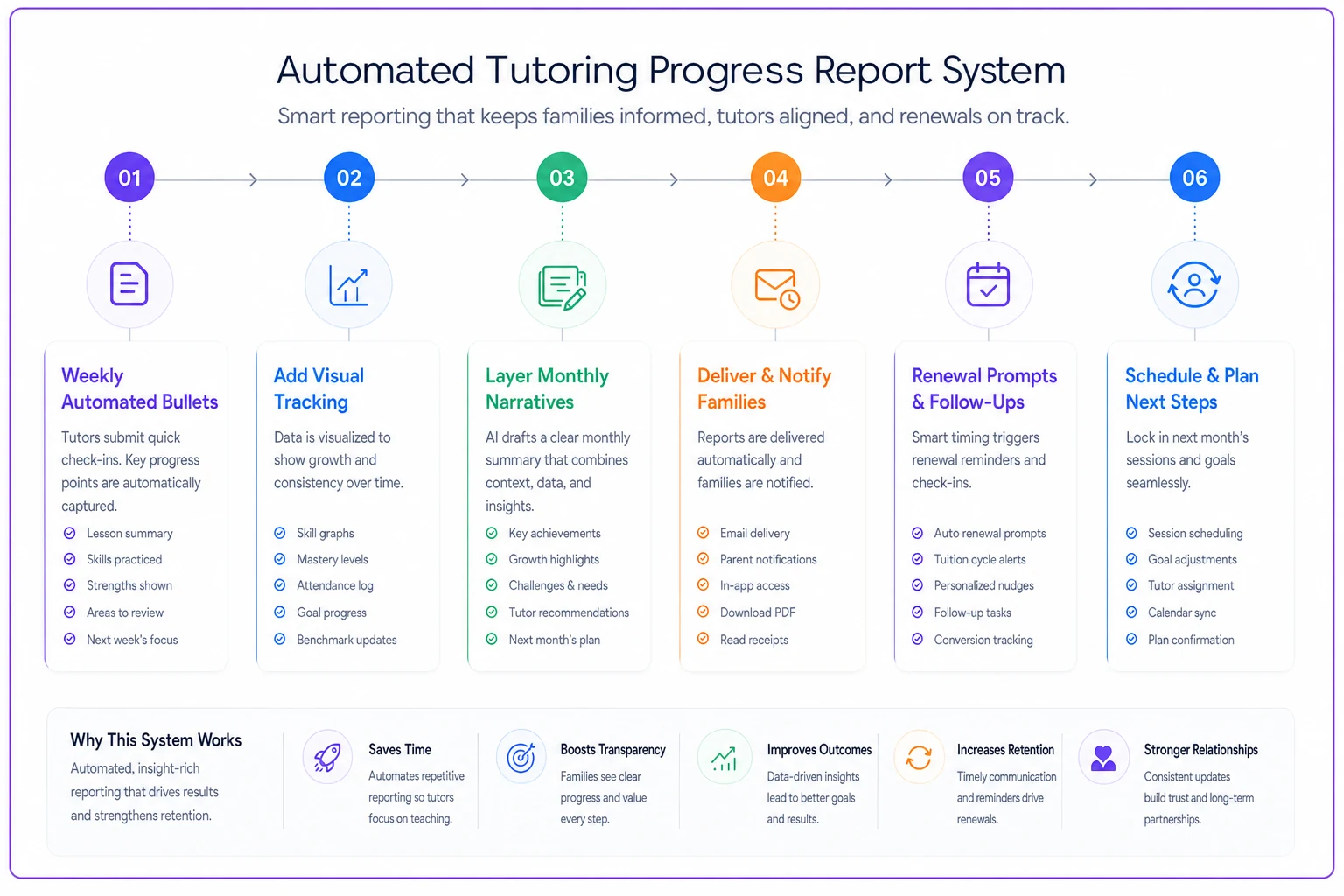
Tutors don't prep for renewal—the system hands them everything they need.
The compound effect on retention
A solid tutoring parent progress report system doesn't just reduce churn—it changes how parents perceive tutoring value altogether. Instead of wondering if tutoring works, they watch it work every week.
The math is pretty straightforward. Without consistent progress reporting, the average tutoring client stays around four months. With weekly touchpoints and monthly reports, that often stretches to seven months or more. That's not just more revenue per family—it's significantly less marketing spend replacing them.
The bigger effect shows up in referrals. Parents who see consistent, visible progress don't just stay—they recruit. They share the visual charts with friends. They forward the weekly updates to other parents considering tutoring. Progress reports become marketing collateral people actually want to pass along.
The operational lift looks heavy upfront, but automation handles the bulk of it once things are configured. Tutors go from spending zero minutes on progress communication to about five minutes a week—and retention climbs noticeably. Every minute invested in progress reporting returns multiples in reduced churn and organic referrals.
Progress reports aren't administrative overhead. They're the primary retention tool most tutoring centers are ignoring. The gap between growing centers and struggling ones usually isn't teaching quality—it's whether parents can actually see and understand what's happening. A well-built tutoring parent progress report system makes invisible progress visible, turns confused parents into committed partners, and converts short-term clients into long-term ones.
The system laid out here—weekly automation, visual tracking, conversation scripts, renewal integration—takes roughly 20 hours to build initially. After that it runs mostly on its own, requiring only a few minutes per student each week. For a center with 50 students, that upfront investment can easily prevent losing 15 families a quarter. The return on that is hard to argue with.
Ready to streamline your tutoring operations?
Join 500+ tutors and centers using Tutoryly to save time, improve scheduling accuracy, and enhance student experiences.